¶ Expansion Settings
This screen allows you to manage the Expansion Board hardware functions. This is where the inputs and outputs are defined to interface with external equipment like relays, pack heating and cooling, circuit breakers, contactors, or any other external equipment you wish to interface in a simple way with Batrium equipment.
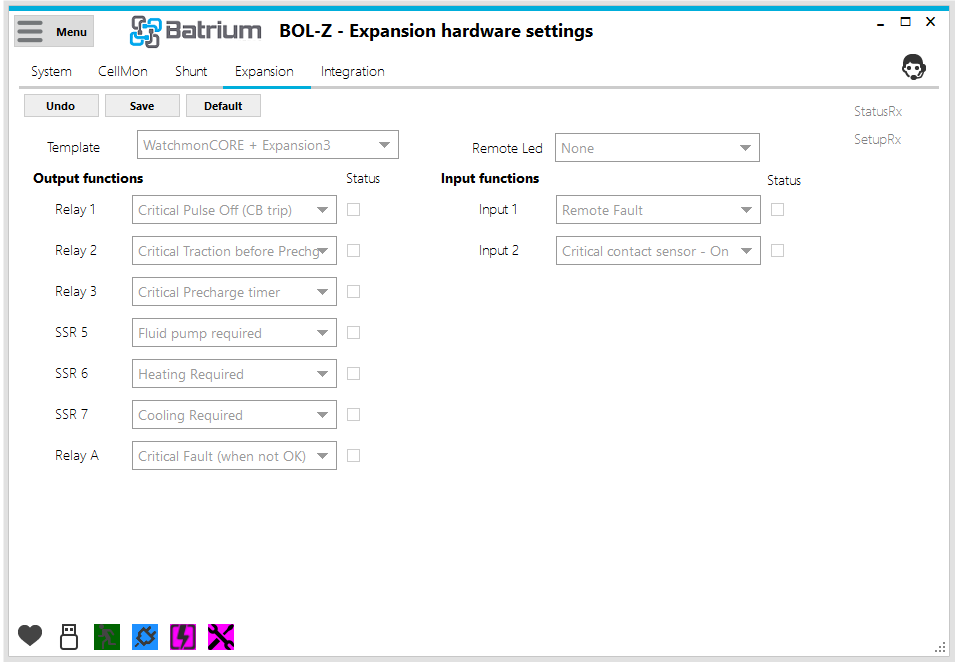
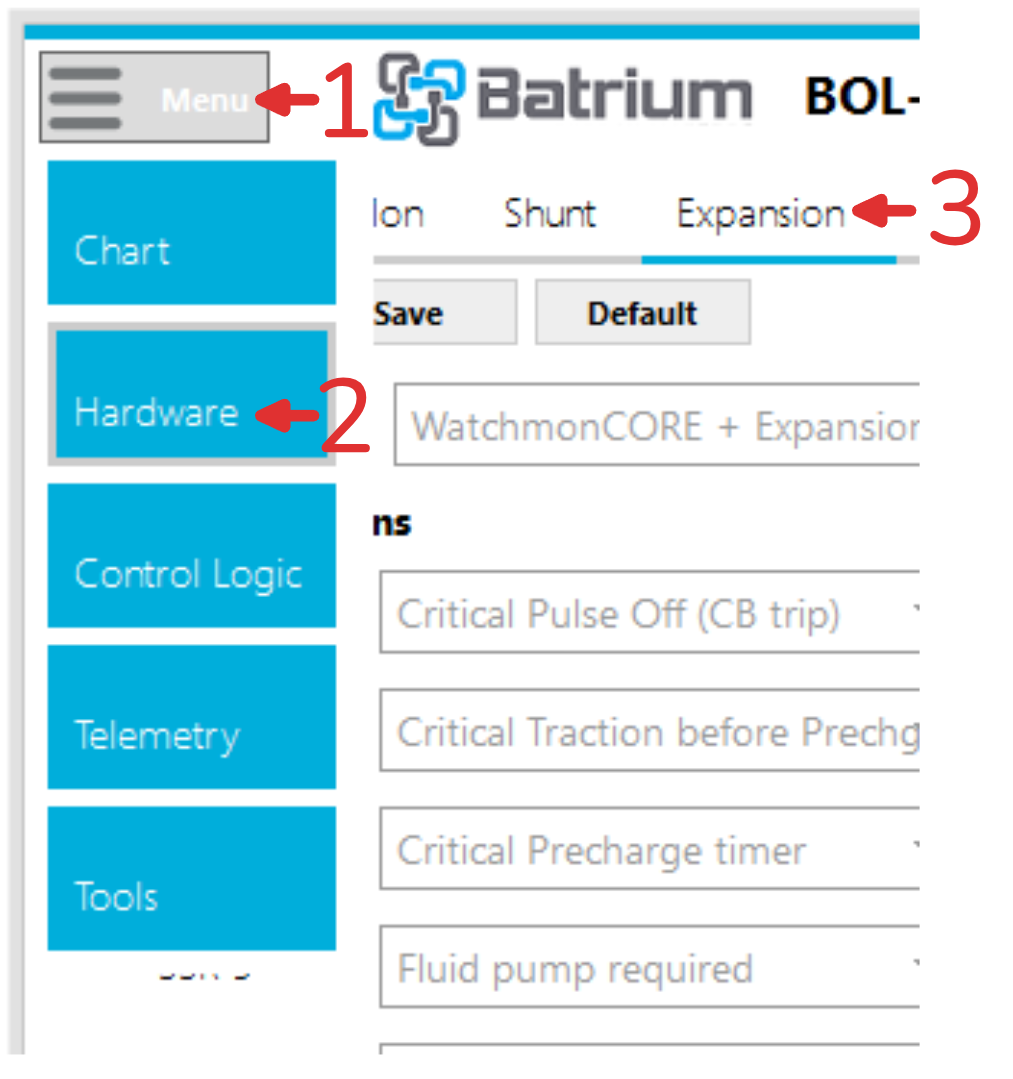
This page is accessed via the Main Menu then the Hardware section, and the Expansion tab.
¶ Field Definitions
¶ Template Option
- This field defines which expansion inputs and outputs are available, and must match the hardware you have installed.
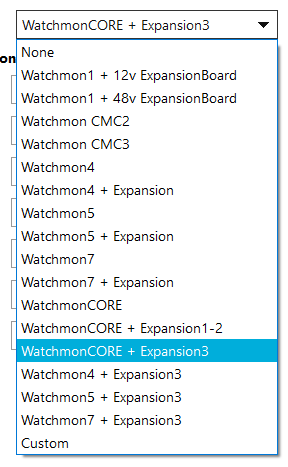
Depending on your Selection different options are available. You will be asked for a PIN Code before the change occurs. This is the number found on the back of your WatchMon.
¶ Output Options
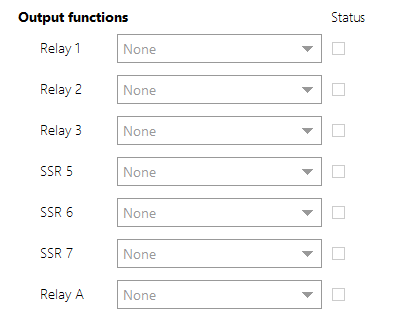
These fields can be set individually to activate when the prerequisite condition is met in the BMS. For our most common hardware combination, a WatchMonCORE and Expansion Board 3, you will have access to relay A on the WatchMon, as well as Relays 1-3 and SSRs 5-7 on the Expansion board.
¶ Input Options
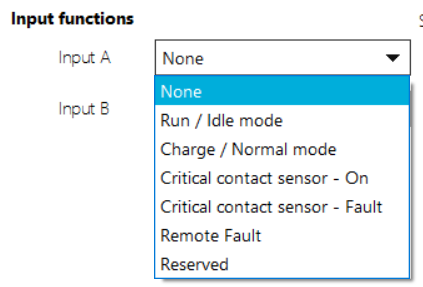
Inputs 1, 2, 3 and 4: Can be set individually.
¶ Action Button / Process Link Events
¶ Status RX
Flashes as status telemetry is received (hover over will display time received).

¶ Setup RX
Flashes when setup configuration is received (hover over will display time received).
¶ Edit Button
This button opens fields to editing, only available when in Technician mode.

¶ Undo
Restores values to last saved values and returns to read-only mode.

¶ Save
Saves values into the system and returns to read-only mode. This only works when connected by a USB. If saving whilst connected via WiFi the following Error message appears.

¶ Default
Restore values to default.
¶ Support Tip
Pressing this button calls up the knowledge base on this screen.

¶ Expansion Output Functions
| # | Setting | Behaviour | |
|---|---|---|---|
| F00 | None | No function selected, output will stay Off/Open at all times. | |
| F01 | Manual On | Output will stay On/Closed at all times. | |
| F02 | Critical BattOK |
The output will be On/Closed for as long as the critical state of the battery is BattOk. When the battery enters any other state such as Critical Fault or Precharge, the output will be Off/Open. |
 |
| F04 | Charging On |
The output will be On/Closed for as long as the charging state of the battery is On. When the charging state is Limited Power, Complete or Off, the output will be Off/Open. |
 |
| F05 | Discharging On |
The output will be On/Closed for as long as the discharging state of the battery is On. When the discharging state is Limited Power or Off, the output will be Off/Open. |
 |
| F06 | Heating Required |
When the Heating Parameters in Control Logic > Thermal are met (i.e. a temperature is too low, below Threshold) the output will be On/Closed. The output will be Off/Open once the the monitored temperature goes above the Threshold + Gap temperature after the number of seconds set by Delay Transition. |
 |
| F07 | Cooling Required |
When the Cooling Parameters in Control Logic > Thermal are met (i.e. a temperature is too high, above Threshold) the output will be On/Closed. The output will be Off/Open once the the monitored temperature goes below the Threshold - Gap temperature after the number of seconds set by Delay Transition. |
 |
| F08 | Run/Idle input |
This indicator will follow the Run/Idle input of the Expansion board, with no logic in between. If the input is above it's activation threshold, this output will be On/Closed. If the input is below ~3.4V, this output will be Off/Open. Some customer projects chain together this output with CriticalBattOK to start an EV only when the run switch is engaged, and the battery is not in a critical state |
|
| F09 | Charge/Normal input |
This indicator will follow the Charge/Normal input of the Expansion board, with no logic in between. If the input is above ~3.4V, this output will be On/Closed. If the input is below ~3.4V, this output will be Off/Open. Some customer projects chain together this output with CriticalBattOK to start an EV only when the run switch is engaged, and the battery is not in a critical state |
|
| F10 | Bypass Complete | Once all cell monitors have entered the Bypass Complete state (configured on the , this output will be On/Closed. Otherwise it is Off/Open. | |
| F11 | Charging Limited |
The output will be On/Closed for as long as the charging state of the battery is Limited Power. When the charging state is On, Complete or Off, the output will be Off/Open. |
|
| F12 | Discharging Limited |
The output will be On/Closed for as long as the discharging state of the battery is Limited Power. When the charging state is On, Complete or Off, the output will be Off/Open. |
|
| F13 | Critical Recovery | Setup to suit the requirements of specific customer Do Not Use |
|
| F14 | Critical Pulse On |
When the Critical State of the battery enters the BattOk state (good), this function will turn the output On/Closed for 200ms (0.2s), remaining Off/Open after that. It is used for latching contactors (or circuit breakers) to re-engage the main contact after a critical event has ended, and after pre-charge. |
|
| F15 | Critical Pulse Off (CB trip) |
When the Critical State of the battery enters the Critical Fault state (good), this function will turn the output On/Closed for ~200ms (~0.2s), remaining Off/Open after that. It is used for latching contactors (or circuit breakers) to open the main contact in a critical event. |
|
| F16 | Critical Fault (when not OK) |
The output will be On/Closed for as long as the critical state of the battery is Fault or Precharge. When the battery enters any other state such as BattOk or Precharge, the output will be Off/Open. |
|
| F17 | Critical Precharge timer |
The output will be On/Closed for a number of seconds (default 2 seconds, configurable in Critical > Extra Parameters) before the Critical State enters BattOk after a fault or first system power on. This allows the capacitors in a motor drive or inverter to gently charge up to the battery voltage before engaging the main contactor, preventing arcing and eventual failure of the contactor |
|
| F18 | Fluid pump required |
When the Heating OR Cooling Parameters in Control Logic > Thermal are met (i.e. a temperature is too low or high) the output will be On/Closed. The output will be Off/Open once neither heating or cooling is requred. This is intended for use with liquid cooled battery packs, like those found in performance EVs. |
|
| F19 | Strip cycle discharge | Setup to suit requirements of specific customer Do Not Use |
|
| F20 | Strip cycle isolate | Setup to suit requirements of specific customer Do Not Use |
|
| F21 | Warning HVA charge |
If any of Cell Hi Cutout (CV10), Supply Hi Cutout (BS5), or Shunt Hi Cutout (QV8) are triggered due to a high voltage, the output will be On/Closed If all of these voltages are below their respective thresholds, the output will be Off/Open These thresholds can be found on the Control Logic > Charging tab. |
|
| F22 | Warning LVA discharge |
If any of Cell Low Cutout (CV3), Supply Lo Cutout (BS2), or Shunt Low Cutout (QV2) are triggered due to a low voltage, the output will be On/Closed If all of these voltages are above their respective thresholds, the output will be Off/Open. These thresholds can be found on the Control Logic > Discharging tab. |
|
| F23 | Charging Remote Running |
This output acts as an enable switch for a contactor connected to charger in an EV application. This output will be On/Closed when the Charging State is On or Limited. This output will be and Off/Open if the Charging State is Off. |
|
| F24 | Charging Off |
This output will be On/Closed when the Charging State is Off. This output will be and Off/Open if the Charging State is On or Limited. |
|
| F25 | Discharging Off |
This output will be On/Closed when the Discharging State is Off. This output will be and Off/Open if the Discharging State is On or Limited. |
|
| F26 | Bypass Fan Prolonged |
This output will be On/Closed during bypass (balancing). This output will change to Off/Open approximately 60 seconds after bypass has stopped. |
|
| F27 | Charging Alternative | Relates to settings found in the Control > Scheduler tab. Can be used to schedule different charge sources to activate at different times. | |
| F28 | Discharging Alternative | Relates to settings found in the Control > Scheduler tab. Can be used to schedule different loads to activate at different times. | |
| F29 | Charging Strip | Setup to suit the requirements of specific customer Do Not Use |
|
| F30 | SoC% Limit 1 | If the SoC% of the battery is within the bounds set by SoC% Limit 1, this output will be On/Closed, otherwise it will be Off/Open. | |
| F31 | SoC% Limit 2 | If the SoC% of the battery is within the bounds set by SoC% Limit 2, this output will be On/Closed, otherwise it will be Off/Open. | |
| F32 | SoC% Limit 3 | If the SoC% of the battery is within the bounds set by SoC% Limit 3, this output will be On/Closed, otherwise it will be Off/Open. | |
| F33 | SoC% Limit 4 | If the SoC% of the battery is within the bounds set by SoC% Limit 4, this output will be On/Closed, otherwise it will be Off/Open. | |
| F34 | Critical Traction before Prechg |
This is intended for EV use on the main negative contactor. If the battery is in a Critical Fault state, this output will be Off/Open. If the battery is transitioning into a Critical BattOk state, this output will be On/Closed first, followed by a Critical Precharge timer output if present, followed by a Critical BattOk output if present. |
|
| F35 | Startup Delay 1s | This output will be Off/Open for 1 second after the WatchMon has booted, after 1 second it will be On/Closed | |
| F36 | Startup Delay 2s | This output will be Off/Open for 2 seconds after the WatchMon has booted, after 2 seconds it will be On/Closed | |
| F37 | Charging On/Limited |
The output will be On/Closed for as long as the charging state of the battery is On or Limited. When the charging state is Complete or Off, the output will be Off/Open. |
|
| F38 | Discharging On/Limited |
The output will be On/Closed for as long as the discharging state of the battery is On or Limited. When the discharging state is Off, the output will be Off/Open. |
|
| F39 | CmuAlert Hi Volt |
This output will be On/Closed while any cell is above Hi Cell Voltage (CV11) It will be Off/Open while all cells are below Hi Cell Voltage (CV11) |
|
| F40 | CmuAlert Low Volt |
This output will be On/Closed while any cell is below Lo Cell Voltage (CV2) It will be Off/Open while all cells are above Lo Cell Voltage (CV2) |
|
| F41 | CmuAlert Hi/Lo Volt |
This output will be On/Closed while any cell is below Lo Cell Voltage (CV2) or above Hi Cell Voltage (CV11) It will be Off/Open while all cells are between Lo Cell Voltage (CV2) and Hi Cell Voltage (CV11) |
|
| F42 | CmuAlert Hi/Lo Volt+Delta |
This is intended to be used as a trigger for supplementary balancing. This output will be On/Closed while any cell is outside Lo Cell Voltage (CV2) and Hi Cell Voltage (CV11) AND the cell voltage delta (difference between highest and lowest cell) is greater than the threshold set in Hardware > CellMon > More > Different Gap. It will be Off/Open while all cells are outside Lo Cell Voltage (CV2) and Hi Cell Voltage (CV11) OR the cell voltage delta is less than the threshold. |
|
| F43 | ChargeOn when no Dischg |
This output will be On/Closed while the Charging State of the battery is On, and the Discharging State is Off. It will be Off/Open if the charging state is Limited, Complete or Off, or the Discharging State is On |
|
| F44 | Charging Status LED |
This output is intended to be used with an indicator LED to show the Charging State. Its behaviour will follow the below rules:
|
|
| F45 | Reserved | Setup to suit the requirements of specific customer Do Not Use |
¶ Expansion Input Functions
| # | Setting | Behaviour |
|---|---|---|
| S00 | None | No function selected, This input will be ignored by the BMS. |
| S01 | Run / Idle mode |
If this input is On/High, and the criteria in the Control Logic > Critical tab are met, the battery will enter the Critical BattOk state, but we will continue to monitor. If this input is Off/Low, the battery will enter a Critical Fault state. Intended for use in traction applications in order to maintain monitoring but disable the main power loop. |
| S02 | Charge / Normal mode |
If this input is On/High, and the criteria in the Control Logic > Charge tab are met, the battery will be allowed to charge. If this input is Off/Low, the battery will not be allowed to charge. Intended for use in traction applications. |
| S03 | Critical contact sensor - On |
This allows closed-loop control of a latching contactor/circuit breaker, and indicates/confirms its current state. This input should be On/High when the contactor or circuit breaker is closed. If this is not the case, Used in conjunction with the Critical Pulse Off output function, so that the BMS can re-attempt opening the main contact if a previous pulse failed, or the BMS has just booted up and has not been in control of the contact while off. |
| S04 | Critical contact sensor - Off |
This allows closed-loop control of a latching contactor/circuit breaker, and indicates/confirms its current state is Off/Open. Used in conjunction with the Critical Pulse On output function, so that the BMS can re-attempt closing the main contact if a previous pulse failed, or the BMS has just booted up and has not been in control of the contact while off. |
| S05 | Remote Fault |
If this input is On/High, the battery will be forced into a critical state, in the same way it would be if the conditions on the Control Logic > Critical tab had been met. Often tied to emergency stop buttons, or external safety equipment. |
| S06 | Reserved | Setup to suit the requirements of specific customer Do Not Use |